

Key takeaways
- A coding robot for a child is really three purchases hiding in one: a toy, a first programming lesson.
A coding robot for a child is really three purchases hiding in one: a toy, a first programming lesson, and a piece of electronics that has to survive months of dropping and battery swaps. The listed options span from screen-free buttons-and-cards robots for ages 5 to 7 to build-it-yourself kits that teach block coding on a tablet and, later, text coding in Scratch or Arduino. Picking well means matching the robot’s input method to the child’s reading level, patience, and access to a device.
This guide is for parents, grandparents, and classroom teachers choosing a first coding robot. Details come only from the listed product titles, which name age ranges, screen-free modes, color-code markers, and coding platforms, while battery life, app compatibility, and durability are left for the listing to confirm. The aim for 2026 buyers is to separate robots that teach sequencing with no screen from those that lean on an app, so that the choice fits the household rather than the marketing.
Because children move through coding stages quickly, a kit that works for a six-year-old may feel slow to an eight-year-old and baffling to a four-year-old. Thinking about the next stage, not only the current one, saves money and avoids a drawer full of outgrown robots.
Quick Picks
Our top picks



As an Amazon Associate we earn from qualifying purchases at no extra cost to you.
| Product | Best for | Key spec from the title |
|---|---|---|
| Learning Resources Botley 2.0 | Screen-free first coding | Activity set, ages 5 to 7 |
| Learning Resources Code and Go Robot Mouse | Maze and logic play | Maze challenge, ages 5 to 7 |
| Wonder Workshop Dash Robot | Kids 6 and older who like voice and apps | Voice-activated, ages 6+ |
| Ozobot Evo Coding Robot Kit | Mixed age classrooms | Ages 5 to 11 |
| Makeblock mBot | Moving to Scratch and Arduino | Ages 8 to 12, Scratch and Arduino |
| TEACH TECH Mech-5 | Mechanical, no-code-screen builders | Ages 10+, mechanical coding wheel |
How to Choose
Screen-free or app-based
Screen-free robots, such as the Botley and Code and Go options, use buttons, cards, or physical markers to teach sequencing, and they suit children in the 5-to-7 range. App-based robots need a compatible phone or tablet and often unlock more advanced projects, but they depend on updates and device support. Check the listing for the supported devices, and decide whether the household wants a robot that works without a screen at all.
Age range and reading level
The titles name ages 5 to 7, 5 to 11, 6 and older, 8 to 12, and 10 and up. Younger children rely on picture cards and color codes. Older children can read block-based code and use Scratch. A robot labeled for ages 5 to 11 may stretch across more years, but also may not fully satisfy either end. Follow the manufacturer’s age range and supervise young users.
Coding path and growth room
Look at where the robot leads. Screen-free sequencing teaches the idea of ordered steps. Block coding teaches loops and conditions. Scratch and Arduino, which the mBot listing names, open the door to text-style projects. A kit that stops at simple commands will feel limited after a few months, while a kit aimed too high can frustrate a beginner. Pick the step just above the child’s current level.
Durability, power, and storage
Coding robots get dropped, driven off tables, and carried to school. Look in the listing for the power source and charging method, since batteries and cables are the most common failure points. Budget-tier robots may cut corners on wheels, casing, or included accessories. Keep small parts away from younger siblings, store accessory cards together, and follow the manufacturer’s instructions on charging and cleaning.
What to ignore: broad claims such as “STEM toy,” “educational,” or “gift for boys and girls” appear on almost every listing and do not separate one robot from another. Look instead at the stated age range, the input method, the coding platform named, and what is included in the box. Marketing words about awards or popularity are not specs and carry little weight when comparing.
The 6 Best Options
Learning Resources Botley 2.0
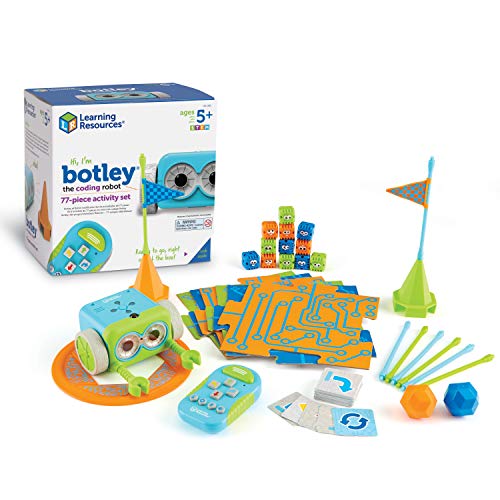
Botley 2.0 is a screen-free coding robot activity set for kids 5 to 7. The listing also covers the original Botley, which shares the same idea of programming with a remote and moving through obstacle setups. For parents who want coding to feel like play rather than homework, a robot that follows a short list of button presses is easy to introduce at the kitchen table, and children can predict what will happen before pressing go, which is the heart of early programming.
- Strength: screen-free play teaches sequencing without a tablet or phone.
- Strength: an activity set format provides starting challenges for young children.
- Trade-off: aimed at 5 to 7, so older children will want a more advanced robot soon.
Skip it if the child is already comfortable with block coding or reads well enough for an app-based robot.
Learning Resources Code and Go Robot Mouse
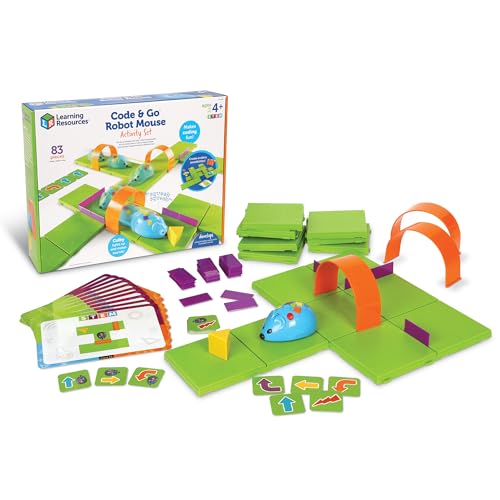
This activity set is built around a robot mouse and a maze challenge for kids 5 to 7, with a focus on early coding skills. It suits a child who likes puzzles and building paths. Rearranging maze walls so the mouse reaches the goal in fewer steps is a natural way to introduce planning ahead, and siblings can take turns designing a course for each other, which makes it more social than a solo gadget.
- Strength: maze play ties coding steps to a visual goal, which keeps younger kids engaged.
- Strength: screen-free robotics with programming for ages 5 to 7.
- Trade-off: the format is mostly about the maze, so open-ended play is limited.
Skip it if a robot that can roam freely or connect to an app is the goal.
Wonder Workshop Dash Robot
Dash is a voice-activated, interactive robot toy for children 6 and older, designed to be programmed through apps. It is the most personality-driven option in the group. Children who engage best with characters, sounds, and responses tend to stay with a robot like this longer than with a plain programmable vehicle, and the app side offers a ladder of challenges as skills improve.
- Strength: voice activation and interactive behavior make it feel like a character, not just a gadget.
- Strength: suited for children from age 6, giving a wider upper range than the 5-to-7 sets.
- Trade-off: it relies on a compatible device, so check the listing for the supported app platforms.
Skip it if a screen-free experience is required.
Ozobot Evo Coding Robot Kit
The Evo is positioned for ages 5 to 11 and for both kids and teachers. That range makes it a candidate for classrooms or families with siblings of different ages. Because the title mentions teachers, it can also work for a small club or tutoring group, where one device can be shared and passed between learners during a lesson.
- Strength: an age span of 5 to 11 covers early and late elementary years.
- Strength: described as a coding kit for kids and teachers, suggesting classroom usefulness.
- Trade-off: the title gives few feature details, so read the listing for how coding is done.
Skip it if the goal is a clearly screen-free entry point with a simple remote.
Makeblock mBot
The mBot is a building-style robot kit for ages 8 to 12, with Scratch and Arduino named in the title. It is a step toward real programming languages. Building the robot first gives a child a sense of how motors, wheels, and sensors fit together, and then coding it adds a second layer. A family comfortable with a laptop will find the ceiling here much higher than with a button-driven toy.
- Strength: Scratch and Arduino offer two coding paths for growth.
- Strength: described as an educational building kit, so assembly is part of the learning.
- Trade-off: building and coding together take time, and younger children will need help.
Skip it if the child wants a robot that works out of the box in minutes.
TEACH TECH Mech-5
The Mech-5 is a coding robot building kit for ages 10 and up that uses a mechanical coding wheel to program the robot to throw, lift, kick, and draw. It does coding without a screen. For a builder who likes gears and mechanisms, that tactile approach can feel closer to engineering than clicking blocks, and the actions listed in the title give a clear target for each project. An adult may still need to help with the first assembly.
- Strength: a mechanical coding wheel offers a tactile way to learn sequences.
- Strength: the listed actions, throwing, lifting, kicking, and drawing, give varied tasks.
- Trade-off: with an age label of 10 and up, it is too advanced for younger children.
Skip it if the child prefers app-based or block coding.
Which One Fits Your Situation
A kindergartener who has never coded
Botley 2.0 or the Code and Go Robot Mouse suit the 5-to-7 range and work without a screen. Pick the mouse for a puzzle-minded child, and the Botley for a child who wants a robot that moves around. Either way, start with short challenges of three or four steps, and add length as confidence grows. Celebrating a robot that does something unexpected, then debugging it together, teaches more than a perfect first run.
A six-to-eight-year-old who likes apps
Dash gives a more interactive experience with voice activation, and the Ozobot Evo stretches across a wider range for a child who may keep using it for years. If one robot has to serve a seven-year-old now and a ten-year-old later, the wider range is the more economical thread to pull on.
A pre-teen ready for real languages
Makeblock mBot offers Scratch and Arduino. It is the pick for a child who wants to move beyond simple commands. Expect a few evenings of building, then months of projects, with a parent nearby for the early sessions.
A builder who likes mechanical projects
TEACH TECH Mech-5 is for ages 10 and up and uses a mechanical coding wheel for actions such as throwing and drawing.
Common Mistakes
- Buying an app-based robot without checking the supported devices at home.
- Choosing a robot far above the child’s reading or patience level.
- Ignoring the age label and letting small parts reach younger siblings.
- Skipping the first few guided sessions, which set the habit of experimenting.
- Forgetting to check charging or battery needs before gifting.
Related guides
- White Elephant Gift Exchange Rules Explained
- Funny Ugly Christmas Sweaters For Women
- How To Host A Tacky Christmas Sweater Party
Frequently Asked Questions
Do coding robots need a tablet?
Some do, and some do not. Botley and Code and Go are described as screen-free, while Dash and others use apps. Check the listing for supported devices.
What age should kids start coding robots?
Several listed options start at ages 5 to 7. Follow the manufacturer’s age range and stay nearby while the child learns the controls.
Which robot teaches real coding languages?
The mBot lists Scratch and Arduino, which are common learning paths. Younger robots teach the ideas of sequencing and logic first.
Are these robots durable?
The titles do not claim durability, so check the listing and reviews of the build. Store the robot away from stairs and tables, and treat the first month as a trial of how well it holds up under real play. If a robot will travel to school or a club, a small bin for the robot, cables, and cards prevents lost pieces and makes setup faster.
More from Amazon
Programs that pair well with the guide above. Offers and eligibility are set by Amazon and may change.
Free shipping on eligible items, Prime Video and more. Eligible new members can start with a free trial.
Start a Prime free trialAudiobooks and podcasts to listen to on the go. Eligible new members can start with a free trial.
Try Audible freeAd-free music streaming. Eligible new subscribers can start with a free trial.
Try Music Unlimited freeA free business account with business pricing and bulk-buying tools for work, shop or home office.
Create a business accountAs an Amazon Associate we earn from qualifying purchases.







Write Your Review
No reviews yet. Be the first to share your experience!